Businesses are under pressure to automate more. AI can screen candidates, manage sales conversations, generate reports and handle entire workflows. It's tempting to look at everything your team does and ask how much you could hand over to technology.
But just because something can be automated doesn't mean it should be.
At mutherboard, we've been experimenting extensively with AI and automation, both in our own business and for clients. Some of the results have been brilliant. Others have reminded us why certain decisions still need a person.
Here's where we draw the line, and three automations we think more businesses should be using.
Why "automate the repetitive stuff" is bad adviceYou've probably heard the advice to automate repetitive tasks. It's a reasonable starting point, but repetition alone tells you little about whether something is suitable for automation.
Take recruitment. Reviewing hundreds of CVs is repetitive, but automatically rejecting candidates based on keyword matches could mean overlooking someone brilliant.
Compare that with copying project information from your CRM into your finance system. It's predictable, follows a set of rules and shouldn't need someone doing it manually.
We generally ask two questions when deciding what to automate: Does this task require human judgement? And what happens if the automation gets something wrong?
We learned an interesting lesson while building a resourcing dashboard for a client. AI was reviewing data showing someone had logged 80 hours in a working week and didn't flag anything unusual.
A person spotted the problem immediately.
AI was useful for organising the data and writing queries, but without the right context and checks, it missed something obvious to someone who understood how the team worked.
3 things we'd never hand over entirely1. The final hiring decisionThere is plenty in recruitment worth automating. Interview scheduling, acknowledgement emails, CV summaries and moving candidates through different stages can all save time.
We're even experimenting with AI conducting initial 15-minute screening interviews.
Although we'd never let AI make the final hiring decision.
A CV tells you very little about how someone thinks, approaches problems or works with other people. Those are things we want to explore in an interview, particularly when one hire can significantly affect a small team.
AI can help prepare and organise information. People should still assess candidates against fair, job-related criteria and make the final call.
2. Sales conversations once a prospect respondsAI is useful for prospecting. It can research companies, find contacts, draft outreach emails and update your CRM.
Where we're more cautious is letting it take over once someone expresses interest.
Think about buying professional services. You want someone who understands your business, can answer difficult questions and knows what their team can deliver.
An AI agent might be able to negotiate and answer questions. But what happens when it makes a commitment your delivery team can't fulfil?
There's also the question of trust. Imagine spending weeks negotiating a significant project, only to discover you've been speaking to an AI agent.
We'd rather use AI to prepare salespeople for conversations and handle the admin afterwards.
3. Decisions about people based on dashboard numbersCapacity planning is a great candidate for automation.
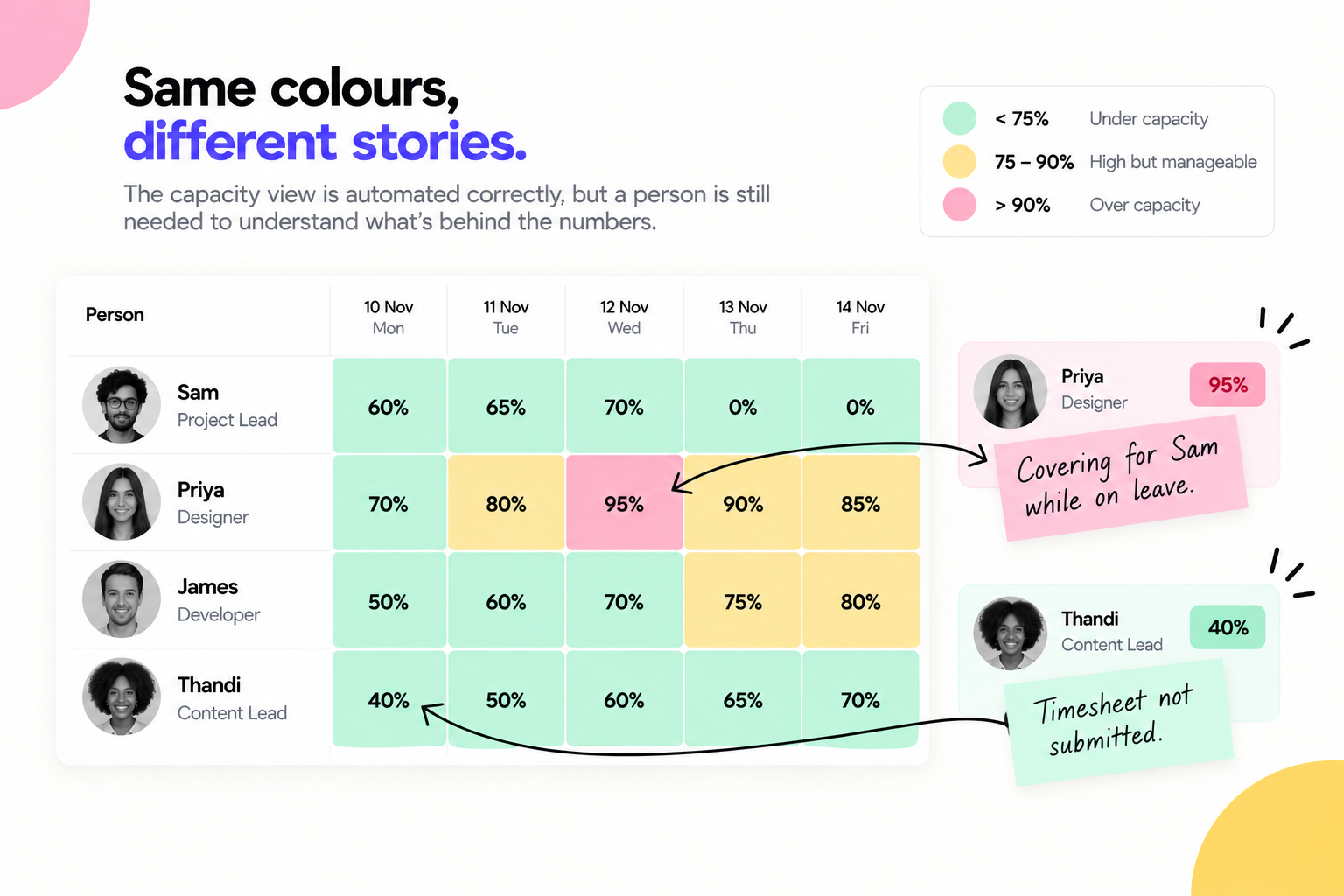
At mutherboard, our capacity dashboard uses three bands: below 75% committed is green, 75–90% is amber and above 90% is red.
An automation can calculate those percentages perfectly well. But a red status doesn't explain why someone is overloaded.
Perhaps they're covering for a colleague on leave. Equally, someone showing 40% capacity might simply have forgotten to submit their timesheet.
We saw the importance of this when capacity emerged as the biggest concern in our employee culture survey.
Our response was to promote someone internally into a dedicated resource planner role. Their job is to understand where the pressure is coming from and plan work accordingly.
We still automate the reporting. A person makes the decisions.
3 things you should have automated yesterday1. Turn forgotten commitments into tasksHow often do you promise to do something in an email or Slack message, then forget to add it to your task list?
We've built an AI agent that helps with exactly that.
Every day at 5pm, it reviews sent emails and Slack messages, looking for commitments we've made. It checks our monday. com task list and creates anything that's missing. A separate automation emails us when a task is added.
You can start with a simpler version. Ask an approved AI tool to identify commitments in your sent messages and produce a list for review. Once you're happy with the results, connect it to your task management system.
2. Stop losing project updates in SlackWe used to share project updates directly in Slack. Convenient, especially when you're away from your desk, but important information quickly disappeared among other conversations.
Now we record updates in monday. com, and an automation sends them to the relevant Slack channel.
Everyone still gets updates in chat, while the full project history stays in one place.
It also means our AI agent can review project information and help identify overdue tasks, missing updates or deadlines at risk.
You can build a basic version with a simple trigger: when a project update is added, post it to the relevant channel.
3. Connect the systems you're already paying forThis is one of the biggest opportunities we see with clients.
Businesses often have perfectly good software. The problem is that their systems don't communicate, so people spend hours copying information between them.
The resourcing dashboard project we mentioned earlier took roughly two months, largely because the underlying data needed fixing. Building the dashboard itself was relatively quick.
We use Make to connect monday. com, our finance system and Slack.
You can start smaller. Find one field your team enters twice, such as a client name or project code. Decide which system holds the original information, then automate the transfer to the other.
Check what happens when information changes or is missing before switching it on.
How to decide what to automate this weekStart with the manual tasks your team already does. Look for repeated data entry, spreadsheet updates and information being copied between systems.
Then consider the consequences of mistakes. A duplicate internal task is easy to delete. An incorrect client invoice or rejected job applicant is much more serious.
Ask whether the process requires someone to interpret a situation or make a judgement. You can often automate the preparation of information while keeping the decision with a person.
Finally, check the data behind it. If your CRM contains duplicate contacts or your project records have missing owners, automating the process will simply carry those problems into another system.
If you're still copying the same information between two systems every day, that's probably a good place to start.